


NoSpamProxy Azure Edition is the cloud based email security gateway of the successful NoSpamProxy family of products by Net at Work. The Azure edition of NoSpamProxy can easiliy be deployed using the Microsoft Azure Marketplace.
NoSpamProxy Azure easily connects an Office 365 tenant and offers an easy way to provide centralized email encryption and decryption with PGP and/or S/MIME for mailboxes hosted in Exchange Online. Additionally, NoSpamProxy Azure provides compliant anti-spam handling, an anti-malware component, and a large file portal.
The edition currently available in Microsoft Azure installs a NoSpamProxy single-server deployment. A single-server deployment combines the NoSpamProxy intranet role and the gateway role on a single server.
The NoSpamProxy Azure Edition is provided as BYOL (Bring Your Own License) deployment. In addition to the recurring fees for the Microsoft Azure VM you are required to buy a NoSpamProxy license. If you already own a NoSpamProxy Version 11 license, the license can be used for the NoSpamProxy Azure Edition as well.
Content
DeploymentOptions
Notes
Deployment
Links
Deployment Options
Due to the nature of a cloud service NoSpamProxy Azure can be operated in different scenarios in Microsoft Azure. By default the system is configured as a workgroup system without any Active Directory domain membership. The different operational scenarios for NoSpamProxy Azure depend on the existence of a Site-2-Site VPN between your Azure deployment and your on-premises IT infrastructure.
- Without Site-2-Site VPN to Microsoft Azure
- An on-premises email server (e.g. Exchange Server or SmarterMail) utilizes NoSpamProxy Azure as an external relay for outgoing messages. Incoming messages are received by NoSpamProxy Azure and are forwarded to the on-premises email server via the internet.
- Email addresses of internal recipients are maintained manually using plain text file. The file itself is imported automatically by NoSpamProxy Azure
This is a viable option, if there aren’t too many email addresses to maintain.
- Good option for Office 365 customers running a cloud only deployment without any on-premises Active Directory users and mailboxes. The required import file can be created by exporting Office 365 recipients and email addresses.
- RDP access to the Azure VM and NoSpamProxy Azure must be limited to an external IP address of the company network.
- An on-premises email server (e.g. Exchange Server or SmarterMail) utilizes NoSpamProxy Azure as an external relay for outgoing messages. Incoming messages are received by NoSpamProxy Azure and are forwarded to the on-premises email server via the internet.
- With Site-2-Site VPN to Microsoft Azure
- AN on-premises email server (e.g. Exchange Server or SmarterMail) utilizes NoSpamProxy Azure as an internal Relay for outgoing messages. Incoming messages are received by NoSpamProxy Azure and forwarded to the on-premises email servers using the Site-2-Site VPN.
- Automated import of internal email recipients from a LDAP source (e.g. Active Directory)
This option simplifies recipient maintenance, as recipients are automatically imported by NoSpamProxy Azure.
- Perfect option for Office 365 customers maintaining user accounts on-premises and running Azure AD Connect or maybe even having a full Office 365 hybrid setup with centralized mail flow.
- RDP access to the Azure VM and NoSpamProxy Azure restricted to internal company network(s).
- AN on-premises email server (e.g. Exchange Server or SmarterMail) utilizes NoSpamProxy Azure as an internal Relay for outgoing messages. Incoming messages are received by NoSpamProxy Azure and forwarded to the on-premises email servers using the Site-2-Site VPN.
Currently a direct connection to Azure AD is not supported, but it is planned for a future release.
Notes
- The Azure Service for NoSpamProxy Azure System requires a Reverse-DNS configuration, as any other public facing SMTP service. External SMTP servers must be able to perform a Reverse-DNS check successfully. A link on how to configure Reverse-DNS in Azure is listed in the Links section.
- The system name of the NoSpamProxy Azure VM should not follow internal IT naming conventions, as the name is publically resolvable. Otherwise you are going to expose your internal naming conventions.
Depending on the size of the Azure VM different throughputs can be reached in regards to emails per minute.
Tests have shown the following results for Standard A Virtual Machines:
| VM Size | CPU Cores | Memory | Emails/minute |
| Standard A1 | 1 | 1,75 | 100 |
| Standard A2 | 2 | 3,5 | 200 |
| Standard A3 | 4 | 7 | 300 |
| Standard A4 | 8 | 14 | 300 |
Deployment
The following steps describe a simple deployment of NoSpamProxy Azure.

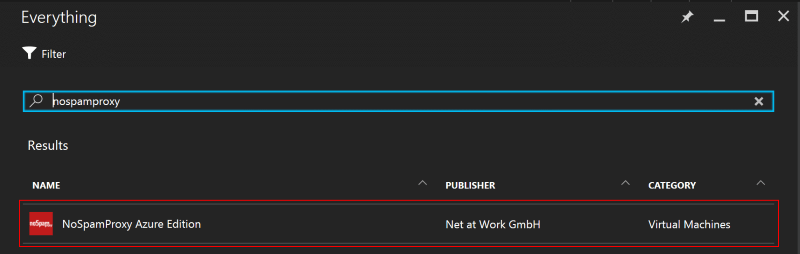
Go to Azure Marketplace and search for NoSpamProxy, select the NoSpamProxy Azure Edition.


Click Create to configure the NoSpamProxy Azure system.


Configure the required parameters as needed
- Name
System name which is added to Azure DNS and externally resolvable. - VM disk type
When selecting SSD as VM disk type, you must choose an Azure VM supporting SSD in a following step. - User name, Password
User name of the local administrator account
As the Azure VM is accessible via RDP from the internet by default, you should use a non-trivial user name and password. - Subscription
Azure subscription to add the Azure resources to. - Resource group
Resource group for the new Azure resources. The example creates a new resource group. - Location
Azure region for the new resource group.


Select an appropriate virtual machine type. NoSpamProxy Azure doesn’t have extraordinary system requirements for processor and memory. SQL Server 2014 Express is downloaded and installed as part of the standard setup of NoSpamProxy. Even SQL Server 2014 Express can be run on a standard VM..


All other settings remain unchanged for this simple deployment. You can adjust the settings, if required for your individual deployment. Especially if you want to utilize exisiting resources.
- Storage Account
Storage for Azure VM VHD files - Virtual Network
Azure virtual network for the new Azure VM - Subnet
Azure virtual network subnet - Public IP Address
External IP address - Network Security Group
Network firewall configuration


Verify the technical summary and click OK to add the configured system to your shopping cart.


Verify the selected Azure service offering and the configured virtual machine. Click Purchase to buy the selected subscription. The deployment is a so called BYOL Deployment and requires a valid NoSpamProxy trial license or an existing full license. After the NoSpamProxy setup as been completed in the virtual machine you will be redirected to a web page to request a trial license.
Connect to the newly deployed virtual machine using Remote Desktop. After first log on NoSpamProxy setup will start automatically as part of an scheduled task. The scheduled task will execute the following steps:
- Configure the preinstalled SQL Server Express Edition
- Download and setup of the most current release of NoSpamProxy
- Redirect to the NoSpamProxy Azure web page to request a trial license
- Removal of the scheduled task

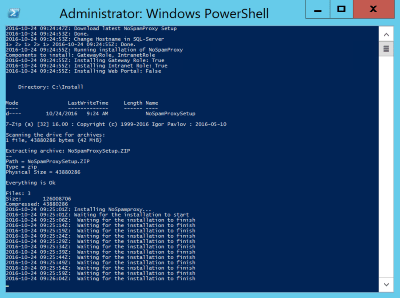
Do not close or interrupt the Windows PowerShell window.
After the setup has finished the public web page of NoSpamProxy Azure Edition will be opened in Internet Explorer. After initial setup of the operating system Internet Explorer runs in secure mode. Therefore, a security warning is displayed. Just add the web page to the list of exclusions and request your personal NoSpamProxy trial license.
The program setup adds new security groups and adds the logged on account to these security groups. It is required to log off and log on again to reflect the new group memberships. This is mandatory to sucessfully manage NoSpamProxy.
After log on start the NoSpamProxy Configuration MMC to import the license.
The NoSpamProxy Configuration MMC displays the NoSpamProxy version.


After initial import of the license you can start configuring NoSpamProxy to suit your needs.
Links
- NoSpamProxy Azure
- NoSpamProxy Protection
- Blogartikel: Gateway based email encryption with Office 365
- Microsoft Azure Trial
- Microsoft Azure Reverse DNS
- Microsoft Azure Reverse DNS mit der CLI